
Docklark
Native SSH client for Apple Silicon Mac that brings connections, terminal tabs, split panes, SFTP, and host monitoring
Detalhes da listagem
Registro de diretório da HiCyou
- Site listado
- docklark.com
- Registro de diretório criado
- 16 de nov. de 2026
- Última atualização do registro
- 16 de nov. de 2026
Informações incluídas na listagem
- Visão geral
- 8 recursos principais
Esta página descreve o registro de diretório da HiCyou. Ela não é uma certificação de segurança, propriedade ou qualidade do produto.
Revise o site externo antes de compartilhar informações confidenciais ou fazer uma compra.
O que é Docklark
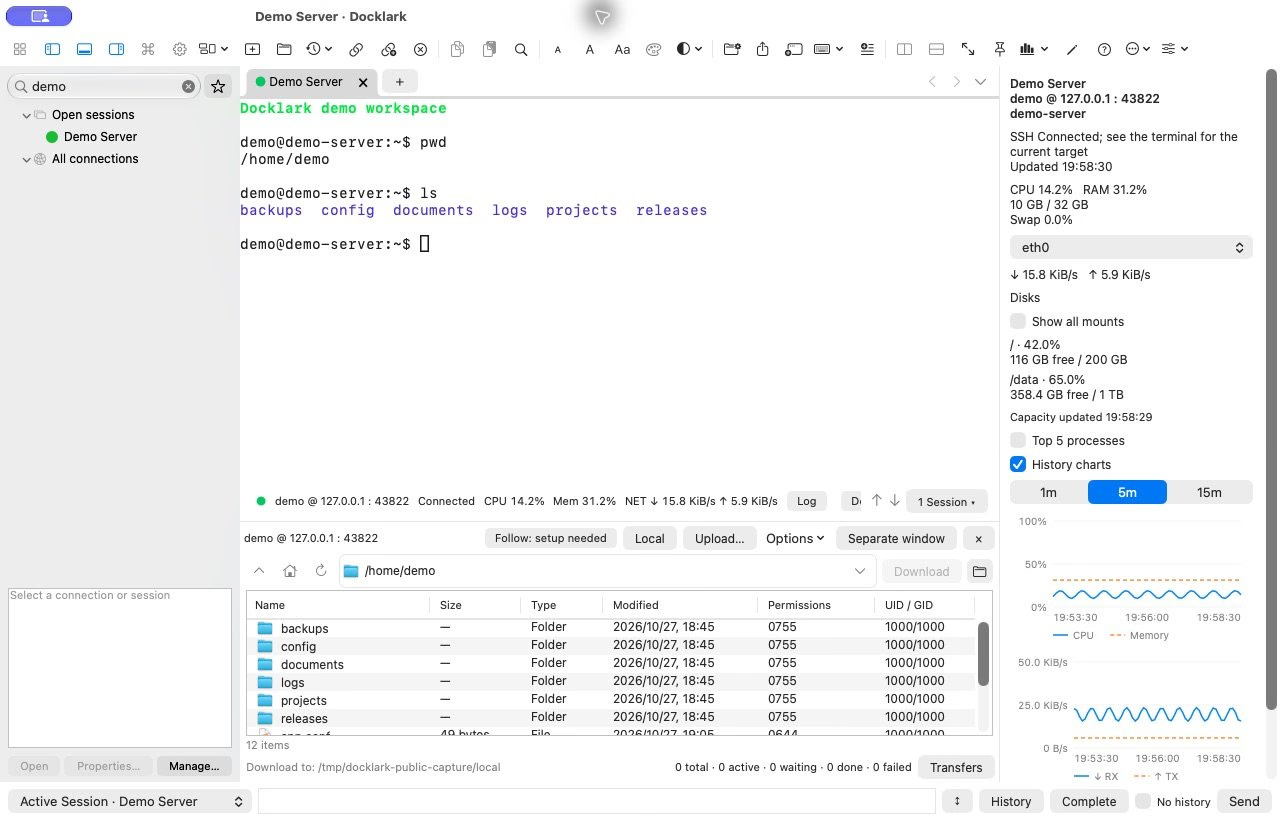
Docklark is a native SSH client for Mac built for direct server connections and access through JumpServer. It turns day-to-day remote work into a single graphical workspace: saved hosts, multi-session terminals, file transfer, and light host monitoring side by side.
What is Docklark? A desktop SSH workspace for Apple Silicon Mac. Organize connections in folders and favorites, keep several sessions in tabs and split panes, browse local and remote files over SFTP, and check CPU, memory, and load for the SSH entry host without leaving the app.
What makes Docklark stand out?
- Native Mac app aimed at Apple Silicon
- Direct SSH and JumpServer / bastion-style workflows
- Tabs and split panes for multi-session work
- SFTP file browser beside the terminal
- Remote monitoring for the entry host (CPU, memory, load)
- Tool center for processes, containers, and forwarding
- Light and dark UI with multiple terminal palettes
- English and Simplified Chinese interfaces
How does it work?
- Add and organize hosts (folders, favorites, templates)
- Connect and arrange sessions in tabs or splits
- Open SFTP for the same entry host when you need files
- Use monitoring and the tool center for host activity
Who should use Docklark? Ops, DevOps, and developers who live in SSH on Mac and want a graphical workspace instead of only Terminal tabs — especially when JumpServer, multi-session layouts, or SFTP next to the shell matter.
Pricing Native Mac download (public builds target Apple Silicon). Check https://docklark.com/ for the current download and any paid plans listed there.